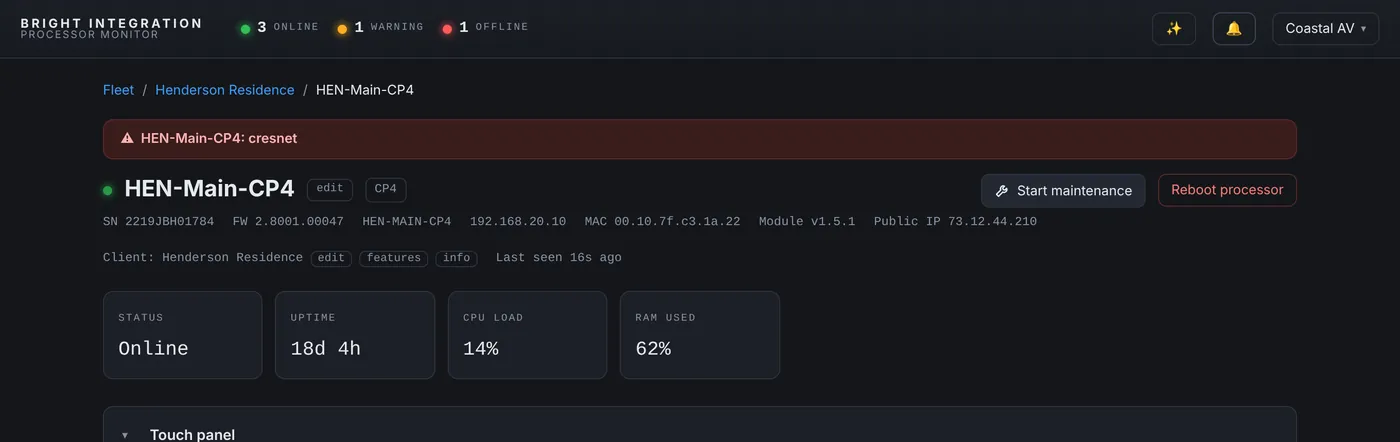
Cresnet monitoring is the newest part of Processor Monitor, added in Bright Monitor Agent 1.5.0 and refined in 1.5.1. Before writing it, I ran the processor’s reportcresnet command on several systems in our fleet to see real output. One of them has a C2N-SPWS300 power supply on the bus, and its line looks like this:
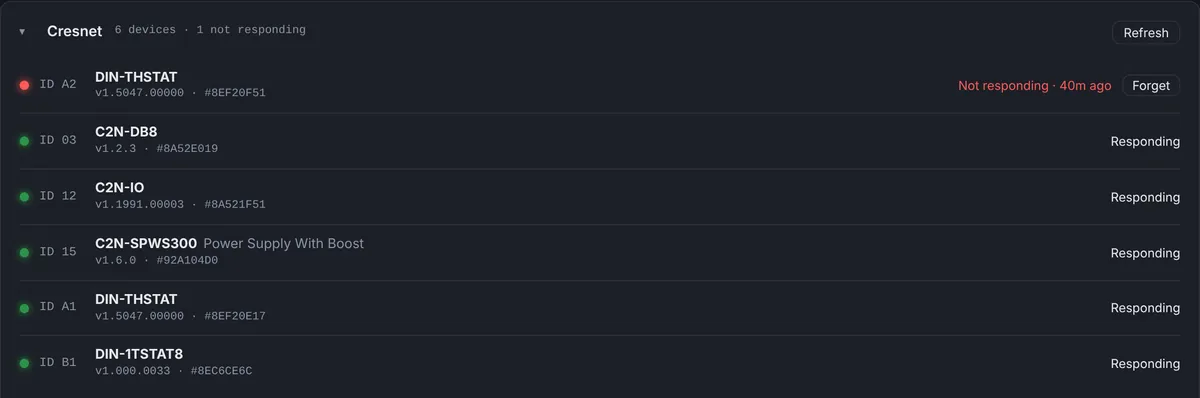
15: C2N-SPWS300 Power Supply With Boost [v1.6.0, #92A104D0]
We haven’t had a Cresnet power supply fail in the fleet since this feature went live, and I’m not going to pretend we have. But I know exactly what you will see when one does, because the detection logic is simple and it is the same for every device. Here it is, step by step.
Why this failure is hard to catch
A Cresnet power supply feeds a run of keypads, thermostats or modules. When it stops, those devices lose power and stop answering. None of them have IP addresses, so the processor’s IP table doesn’t change, network monitoring sees nothing, and the processor itself keeps running happily. The first sign is usually a client pressing a keypad that does nothing, or a DIN thermostat zone that stops being controlled, often days later in a room nobody uses much.
Minute zero: the supply stops
Nothing happens on the dashboard yet. The agent doesn’t query Cresnet on every 60-second report, so a large Cresnet network isn’t hammered every minute. The Cresnet panel still shows the last check.
At the next 10-minute check
The agent runs reportcresnet. That command only lists devices that answer, so the power supply and everything it was feeding are simply missing from the list. The dashboard remembers every device it has ever seen at this processor, so it knows exactly which IDs are gone. Because these devices were there last time, the agent schedules one more check about a minute later. A single missed answer never raises an alarm on its own.
About a minute later: the confirm check
If the devices are still missing, they are marked not responding, each with its ID and model, and the Cresnet alert goes out by push notification and email to the dealer and the assigned team. Because every missing device is named, the alert reads something like “Cresnet ID 15 (C2N-SPWS300), ID A1 (DIN-THSTAT), ID A2 (DIN-THSTAT) are not responding”.
Reading the pattern
This is where the list earns its keep, because the shape of the failure tells you where to look before you leave:
- One device missing, the rest answering: that device, its connector or its cable run.
- Several devices missing at once, including the power supply: the supply itself or its AC power. Check the outlet or breaker feeding it, and the supply’s fuse.
- Several devices missing, the supply still answering: the run between them, or a load the supply can no longer carry.
- Everything missing: the Cresnet port on the processor or the main run near it.
Pair that with the event log, where restarts, WattBox power events and IP-ID disconnects sit on the same timeline, and you often know whether there was a power event in the rack at the same moment.
After the repair
At the next check, the devices answer again, the dashboard marks them as responding, and a “Resolved” message goes out. If the supply was replaced with a new unit at the same Cresnet ID, the event log records the swap with the old and new serial numbers. Every Cresnet device carries its firmware version and serial, so the site keeps an accurate inventory without anyone opening Toolbox.
The timing, honestly
From failure to alert takes up to about 11 minutes: up to 10 minutes until the next check, plus the 1-minute confirm. I chose that on purpose. An earlier version checked every minute, and on a big Cresnet network that is a lot of console traffic for very little gain. For devices that fail and stay failed, eleven minutes is still hours or days ahead of the phone call.
If you have a Cresnet system with a known weak supply or a long run, this is the feature that would have told you about it first.
Used in this post
Cresnet Monitoring and Crestron 4-Series Processor Monitoring, part of Processor Monitor. $99 per processor per month, cancel anytime.