The blind spot in most Crestron monitoring
Network monitoring sees anything with an IP address. A lot of what keeps a Crestron system working has none: Cresnet keypads, DIN-rail thermostats, C2N-IO modules, dimmer modules and the Cresnet power supplies that feed them. When one of them drops off the bus, nothing on the network changes. The client simply finds a keypad that does nothing, or a zone that never cools.
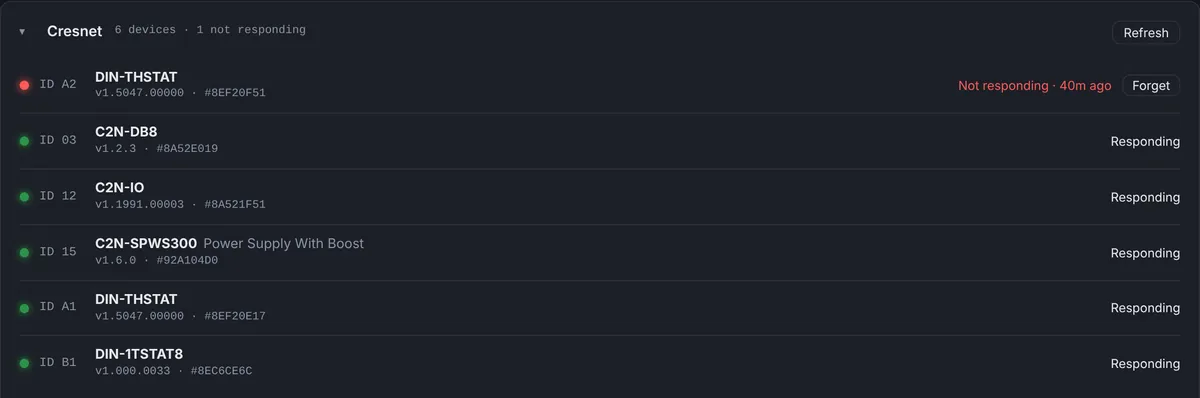
Starting with Bright Monitor Agent 1.5.0, the agent reads the Cresnet bus with the processor’s own reportcresnet console command. That command lists every device answering on the main Cresnet leg with its ID, model, firmware version and serial number, for example:
15: C2N-SPWS300 Power Supply With Boost [v1.6.0, #92A104D0]
A1: DIN-THSTAT [v1.5047.00000, #8EF20E17]
B1: DIN-1TSTAT8 DIN-1TSTAT8 [v1.000.0033, #8EC6CE6C]
Those lines are real output from processors in our fleet. The dashboard turns them into a list of devices with their status.
How a missing device is detected
The reportcresnet command only lists devices that answer. A device that is gone simply isn’t in the list, so the dashboard has to remember what used to be there. Agent 1.5.1 works like this:
- A check every 10 minutes. The agent runs
reportcresnetonce at startup and then every 10 minutes. The processor’s regular 60-second report doesn’t touch Cresnet, so a large Cresnet network is not queried every minute. - A confirm check a minute later. When a device that was there last time is missing, the agent checks again about a minute later. A single missed answer never raises an alarm.
- Not responding, with an alert. If the device is still missing on the confirm check, the dashboard marks it “not responding” and the Cresnet alert goes out by push notification and email.
- Responding again. When it comes back, it shows as responding at the next check and a “Resolved” message goes out.
The Cresnet alert rule turns itself on the first time Cresnet devices are found on a processor, so you don’t need to remember to set it up.
Swaps and new devices are logged by serial number
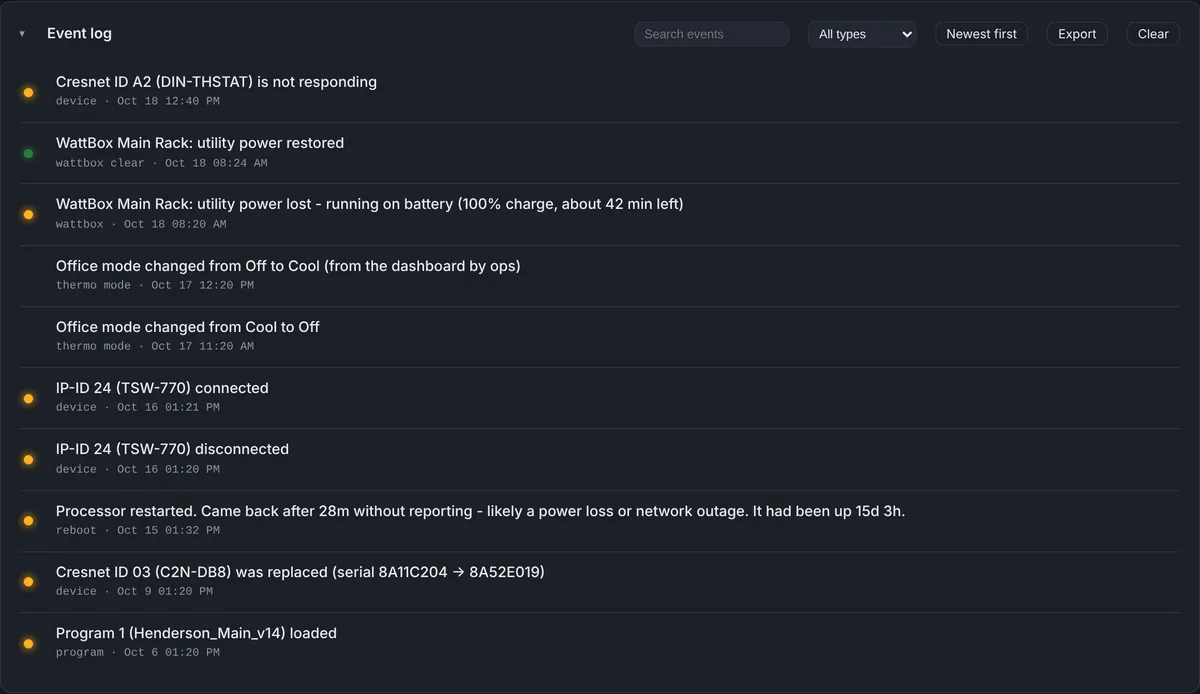
Because every check includes serial numbers, the dashboard notices when a device at the same Cresnet ID is replaced. The event log records it as “Cresnet ID 03 (C2N-DB8) was replaced (serial 8A11C204 -> 8A52E019)”. New devices are logged when they first appear, and the first report from a processor is summarized as one line, such as “Cresnet: 5 devices found on the main Cresnet leg”, instead of one line per device.
That gives you a running inventory of every Cresnet device at every site, with firmware versions, without opening Toolbox. A device you removed on purpose can be taken off the list with Forget, so it doesn’t keep showing as not responding.
What to do when the alert fires
The alert names the device by ID and model, so you know what you are looking for before you leave. A single device that drops while the rest of the bus answers usually means its wiring, its connector or the device itself. Several devices dropping at once points to a shared cause, such as a power supply or a damaged run. We wrote up what happens when a Cresnet power supply drops off the bus step by step.
On the Client Site View, Cresnet appears as one line under Site devices, for example “5 / 6 responding”, with the missing devices named.
Limits worth knowing
- Main leg only. Devices behind a Cresnet hub or an expansion card that
reportcresnetdoesn’t list won’t appear. - About 11 minutes to an alert. The 10-minute check plus the 1-minute confirm. This is a deliberate trade-off to keep large Cresnet networks quiet.
- Older firmware. If a processor doesn’t know
reportcresnet, the agent waits 6 hours before trying again, and nothing else is affected. - 4-Series SIMPL systems. Cresnet monitoring is part of the 4-Series agent. Crestron Home processors are not covered yet.
The Cresnet calls this answers
“A keypad in the bedroom does nothing”
Open the processor’s Cresnet panel. If the keypad’s ID is listed as not responding, the processor can’t reach it, and the problem is the keypad, its connector or its run. If it is responding, the bus is fine and the issue is in the programming or the button itself, which you can check remotely before deciding whether to drive out.
“All the keypads on one floor stopped”
Several devices going quiet at the same check is the pattern of a shared cause: a power supply, a hub or a damaged run feeding that part of the house. The alert lists every device that dropped, so you can see at once whether they share a supply.
“We swapped a thermostat last month”
The event log has the date, the Cresnet ID and the old and new serial numbers. That is useful for warranty claims, for knowing which firmware is installed where, and for answering “when was that replaced?” without digging through old work orders.
Questions
Which Cresnet devices are covered?
Anything that answers on the processor’s main Cresnet leg and appears in reportcresnet: keypads, DIN thermostats, C2N-IO and dimmer modules, power supplies and more.
Will this slow down a big Cresnet network?
No. The bus is checked every 10 minutes, not on every report, with one extra check only when a device goes missing.
What agent version do I need?
Bright Monitor Agent 1.5.0 or later; 1.5.1 adds the 10-minute schedule and the confirm check.
Do I need to change my program?
No. Cresnet monitoring is part of the Bright Monitor Agent, which reads the bus with reportcresnet. Your program is not touched.
Is a device that I removed on purpose going to keep alerting?
No. Use Forget on that device and it is taken off the list.
Part of Processor Monitor, the Crestron monitoring dashboard for dealers. $99 per processor per month, every feature included.